
Microsoft has confirmed a Windows 11 bug that can quietly consume more than 500GB of storage on a user’s drive, and the company has shipped an out-of-band update to stop the bleed. The problem is rooted in a single system file tied to Windows 11’s permission controls, and it has been growing unchecked on affected machines for weeks or even months before users notice their free space vanishing.
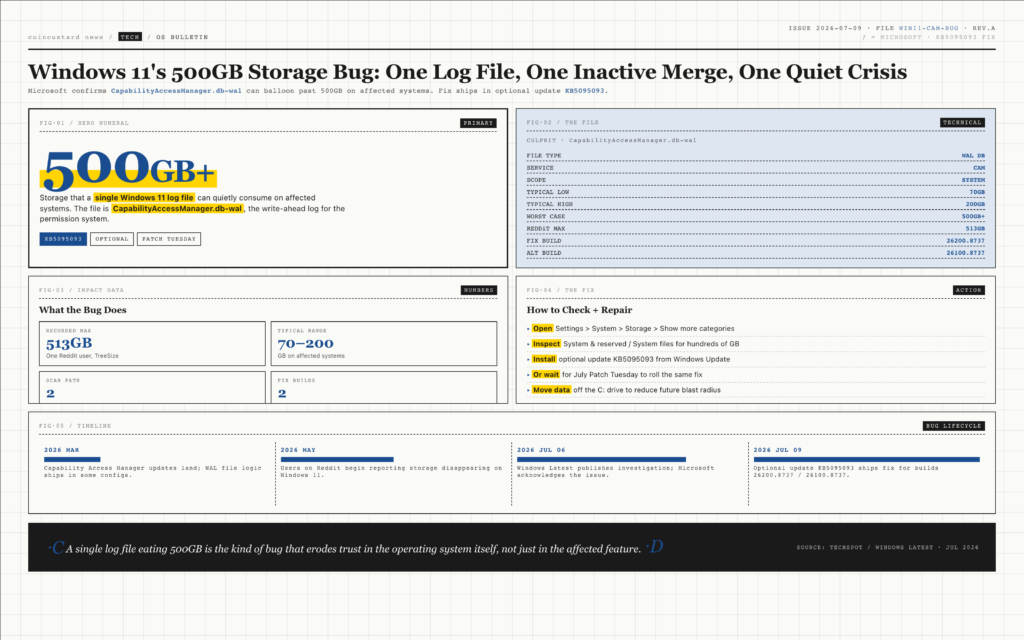
The bug was first flagged by the publication Windows Latest and confirmed by Microsoft in the release notes for its July cumulative update. The culprit is a database file called CapabilityAccessManager.db-wal, the write-ahead log that backs the Capability Access Manager service. The service is responsible for managing app access to privacy-sensitive features such as the camera, microphone, location, contacts, and screen capture, and it records each request in the log. In normal operation, the log is supposed to be merged back into the main database and compacted. On affected systems, the log keeps growing until it occupies hundreds of gigabytes of system drive space.
What Is Going Wrong
Windows 11’s permission system has grown increasingly elaborate over the past several releases. The Capability Access Manager service handles the entire surface area of app-level privacy controls, from the obvious features like camera and microphone to the more obscure ones like motion data and eye tracking. Every time an app requests one of these capabilities, the service writes a record. That record is supposed to be ephemeral, but the write-ahead log that holds it is supposed to be merged back into the main database on a regular cadence.
On affected systems, the merge is not happening. The log file simply keeps appending new entries, growing by tens of gigabytes per day in the worst cases. Some users have reported the file ballooning to between 70GB and 200GB, while others have watched it climb past 500GB. One user on Reddit said a disk-space analysis tool showed the file taking up roughly 513GB on their system drive. For a single log file on a consumer PC, that is catastrophic.
How to Check If You Are Affected
Microsoft has published a simple diagnostic in the Settings app. Open Settings, then System, then Storage, then select Show more categories. Look at the line labelled System and reserved, or more specifically System files. If the number is in the hundreds of gigabytes and climbing, the bug has likely hit. If it is a few megabytes, the system is healthy. Anything between a few gigabytes and a few hundred indicates the bug is in progress and needs attention.
For users with multiple drives, the affected file lives on the system drive, which is normally the C: partition. External drives and secondary internal drives are not affected, even if they hold significant data. The bug is also independent of how the user has configured storage sense, temporary file cleanup, or any of the other maintenance features built into Windows 11.
The Fix Is Already Available
Microsoft has shipped the fix as part of optional update KB5095093, which includes builds 26200.8737 and 26100.8737 for the two supported release channels of Windows 11. The release notes say the update improves disk space usage for the CapabilityAccessManager.db-wal file, though the company has not yet published a full root-cause analysis explaining why the merge logic was failing in the first place.
Users can install the optional update through Windows Update’s advanced options, or they can wait for the fix to roll out as part of the regular Patch Tuesday cycle later this month. Microsoft has indicated that the July cumulative update will include the same fix, so users who prefer to let Windows Update run on its default cadence will get the patch automatically. For users who are already over the storage limit, however, the optional route is the faster path to recovery.
A single log file eating 500GB is the kind of bug that erodes trust in the operating system itself, not just in the affected feature.
Why This Bug Is Different
Windows 11 has had its share of high-profile bugs in recent months, from a Patch Tuesday update that broke the Recycle Bin to a separate issue that disrupted OneDrive sync. The 500GB storage bug is in a different category because it is invisible until it is catastrophic. Most users do not check how much space the system is consuming, and a log file that doubles in size every few weeks will not trigger a warning until the drive is almost full.
For users running Windows 11 on a 256GB or 512GB system drive, the bug is more than an inconvenience. A 500GB log file on a 512GB drive means the system is effectively unusable until the file is cleared. For users with larger drives, the bug is a slow-motion crisis: storage space gradually disappears, performance degrades as the drive fills up, and the user has no clear way to know what is happening until the system itself starts to misbehave.
What Microsoft Has Not Explained
The most important unanswered question is why the merge logic stopped working on a subset of systems. The CapabilityAccessManager.db-wal file is used on every Windows 11 install, and yet the bug only manifests on a small percentage of machines. That suggests the trigger is environmental: a particular combination of installed apps, a specific sequence of permission requests, or a long-tail timing issue in the database engine.
Microsoft has not yet published a root-cause analysis, and the company has been characteristically quiet about the scope of the affected install base. For now, the practical advice is straightforward: install KB5095093 as soon as possible, check the storage panel for abnormally large system files, and consider moving large user data off the system drive to reduce the blast radius of any future bug of this kind. The fix is in place, but the trust hit from a log file quietly eating 500GB of storage will take longer to repair.